About This App
- Name Clime: NOAA Weather Radar Live
- Category Tools
- Price 0
- Safety 100% Safe
- Developer SolidDevsKit
- Version 3.10.1
Description
Clime: NOAA Weather Radar Live is a weather radar app for Android and iPhone. It puts live weather radar, a local forecast, severe weather alerts and a hurricane tracker on your phone. Its radar data comes from NOAA, and its alerts come from the US National Weather Service. Below you'll find what the app does, what is free and what needs the Pro plan, how to download it, and where the official NOAA and National Weather Service forecasts come from. Clime is not an official NOAA or National Weather Service app.
What Is Clime: NOAA Weather Radar Live?
Clime is a weather app built around radar. Open it and you see an animated radar map of the United States, so you can watch rain, storms and snow move toward you. Around the map are the tools most people want from a weather app: today's weather, a local forecast for the days ahead, alerts for dangerous conditions and a storm tracker.
The app states that its radar data is provided by NOAA and that its alerts come from the US National Weather Service. It does not claim any affiliation with NOAA or the National Weather Service. In other words, Clime shows government weather data in an easy-to-use app, but it is a separate product.
NOAA, the National Weather Service and the Hurricane Center
People search for NOAA weather, NOAA radar and the NOAA hurricane center when they want an official forecast, so it helps to know who is who.
- NOAA is the National Oceanic and Atmospheric Administration, the US agency for weather, oceans and climate.
- The National Weather Service (NWS) is part of NOAA. It issues the official forecasts, watches and warnings for the United States. Its website is weather.gov, where you can get a local forecast by ZIP code or city.
- The National Hurricane Center (NHC) is part of the National Weather Service. It publishes the official hurricane forecasts, advisories and tracking maps at nhc.noaa.gov.
- The Storm Prediction Center issues the severe weather outlook for thunderstorms and tornadoes, and NOAA's Climate Prediction Center publishes long range weather outlooks.
Clime brings radar and alerts from these sources to your phone, so you can check the weather without opening several websites.
Live Weather Radar
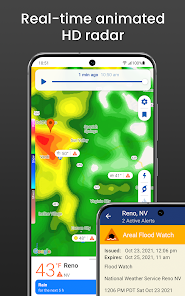
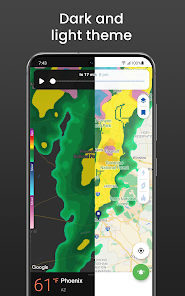
The radar map is the heart of the app. It shows a live radar loop of the last 40 minutes, and you can adjust the overlays and their opacity. NOAA's national radar network uses Doppler radar, which is why radar images show both rain and storm movement. Use the map to check local radar, the national weather radar or the radar online view for your area before you leave the house.
Weather Forecast: Today, Tomorrow and This Week
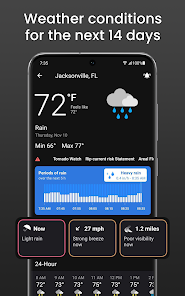
Today's weather and a 7-day local forecast are free in Clime. That covers weather today, weather tomorrow, weather tonight and the weather this week, with the temperature for each day. The app contains ads in the free version.
An hourly forecast for 14 days is part of the Pro plan. The app does not list a 10-day forecast, so if you search for a 10 day forecast or 10 day weather, use the free 7-day forecast, or the hourly 14-day forecast with Pro, to plan ahead. For the official NWS forecast for your exact spot, enter your ZIP code or city on weather.gov.
Severe Weather Alerts
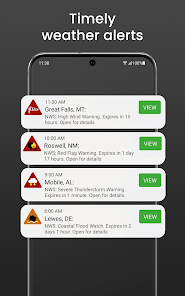
Clime sends push alerts for your bookmarked locations, for example tornado, hurricane and freeze warnings. NWS watches and warnings are drawn as polygons on the map so you can see exactly which area is affected. These alerts cover the United States. Pro adds alerts for all saved locations.
You can also use the warnings map alongside the official NOAA and NWS pages: weather.gov for local alerts, and the Storm Prediction Center for the severe weather outlook.
Hurricane and Storm Tracker
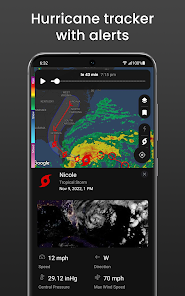
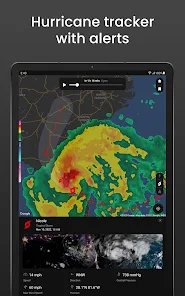
The app includes a hurricane tracker, and its Pro plan lists a hurricane and tropical storm tracker. Use it during hurricane season to follow a storm tracker view of tropical systems that threaten your area, along with live weather radar when a storm comes ashore.
For the official forecast cone, advisories and tracking map, go to the National Hurricane Center website at nhc.noaa.gov. The NHC is the authority on hurricane updates; Clime helps you keep an eye on a storm and receive alerts.
Weather Maps
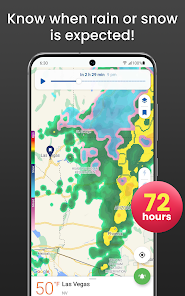
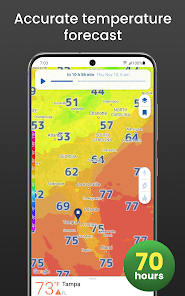
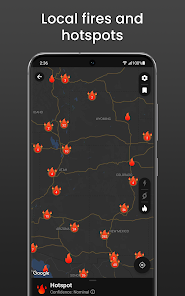
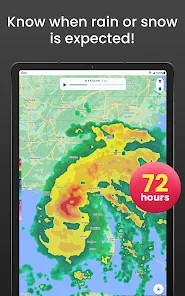
Beyond radar, Clime has weather maps for precipitation and satellite cloud cover. Pro adds more map layers, including temperature, lightning, fires and hotspots, snow depth and pollen. A 24-hour precipitation forecast is free; a 72-hour precipitation map and rain alerts are part of Pro.
Clime Free vs Clime Pro
Free: radar, a 24-hour precipitation forecast, a 7-day local forecast and alerts for bookmarked locations. The free version has ads.
Pro: alerts for all saved locations, a 72-hour precipitation map, RainScope, rain alerts, an hourly 14-day forecast and no ads, among other features. Pro is a subscription that renews automatically through Google Play unless you cancel. Prices change, so check the app for the current plans.
How to Download Clime
Clime on Android
- Open the Google Play Store on your phone or tablet.
- Search for "Clime" and select Clime: NOAA Weather Radar Live.
- Tap Install and wait for the download to finish.
- Open the app and allow location access if you want the local weather for where you are, or bookmark the places you care about.
The safest way to get the Clime weather app on Android is directly from Google Play, which always gives you the official, latest version.
Clime on iPhone and iPad
Open the App Store, search for "Clime" and tap Get. Then open the app and set up your locations and alerts.
On a Computer
Clime is a phone and tablet app. On a computer, use weather.gov for the official NWS forecast and radar, and nhc.noaa.gov for hurricanes.
Pros and Cons
Pros
- Live weather radar with animated loops
- Free 7-day local forecast and alerts for bookmarked locations
- NWS watches and warnings shown on the map
- Hurricane tracker for storm season
- Simple, radar-first design
Cons
- The free version contains ads
- Hourly 14-day forecast, extra map layers and alerts for all saved locations need Pro
- Radar and alerts cover the United States
- It is not an official NOAA or National Weather Service app
Frequently Asked Questions
Is Clime free?
Yes. The app is free to download and includes radar, a 7-day forecast and alerts for bookmarked locations, with ads. Clime Pro is a paid subscription that adds more features and removes ads.
Is Clime an official NOAA or National Weather Service app?
No. Clime uses radar data provided by NOAA and alerts from the National Weather Service, but it is a separate app. For official forecasts, use weather.gov and nhc.noaa.gov.
Where does the radar data come from?
The app states that its radar data is provided by NOAA. Alerts come from the US National Weather Service.
Does Clime have a 10-day forecast?
The app lists a free 7-day local forecast and an hourly 14-day forecast with Pro. A 10-day forecast is not listed.
Can I track hurricanes with Clime?
Yes. The app includes a hurricane tracker, and it can alert you to hurricane warnings for your bookmarked locations. The National Hurricane Center is the official source for hurricane forecasts.
Can I use Clime on my computer?
Clime is a mobile app. On a computer, use the official NWS website at weather.gov.
Download Clime
Clime: NOAA Weather Radar Live is available on Google Play and the App Store. Use the Google Play or App Store buttons on this page to download the app for free, or open weather.gov on your computer for the official National Weather Service forecast. Choose your device to check the weather radar.
Frequently asked questions
If you're an Android user and don't download the app from the official Google Play Store, you may find the installation process more complicated than usual.
We fully understand your concern about safety. We agree that one person wouldn't be too careful in the cyber world. Meanwhile, we are happy to tell you that one of our priorities is to provide our users with safe app files that they can use without any worries.
We guarantee that all the app files we provide originate from official and reliable sources. We promise that they do not contain any malware that will harm your hardware or the safety of your privacy.
We are happy to inform you that the answer is an absolute YES! All the apps on our website are 100% free to download. Besides, you do not have to create an account. Just click on the download button, and it's done.
Recently we received a lot of emails from our users saying they couldn't log in for different reasons, such as "forgot the user name or password" or "had a new phone." We are willing to help you out. Please read the notes below to see what we can do.
To answer this question, please first let us know which account you're referring to.
If you're referring to your account of some app, like your Facebook account or your Youtube account, unfortunately we would not be able to help in this case. We would suggest you turn to the customer service of this application.
This question is essentially quite similar to the prior one. It's a pity that we are unable to help you cancel the subscription to a third-party application directly, while we would suggest you contact its customer service for further information.
Sorry that we are unable to help you get a refund from a third-party application directly. If you wish to get a refund from a third-party app, we would suggest you contact its customer service. We would be happy to provide you the way to contact them.
If you want a refund from us, we should apologize for your confusion. Our service is 100% free, and any payment information is not required.
If you run into any site that asks you to provide your payment information, be careful. Remember never to reveal your payment information to any unauthorized third parties, no matter how tempting their offer may seem.
Sorry that we cannot answer this question directly, as this section only aims to answer some general questions. You may find how to use a certain app by checking our review page.